



IQOS ILUMA Red Light: What It Means and How to Fix It (Every Model)

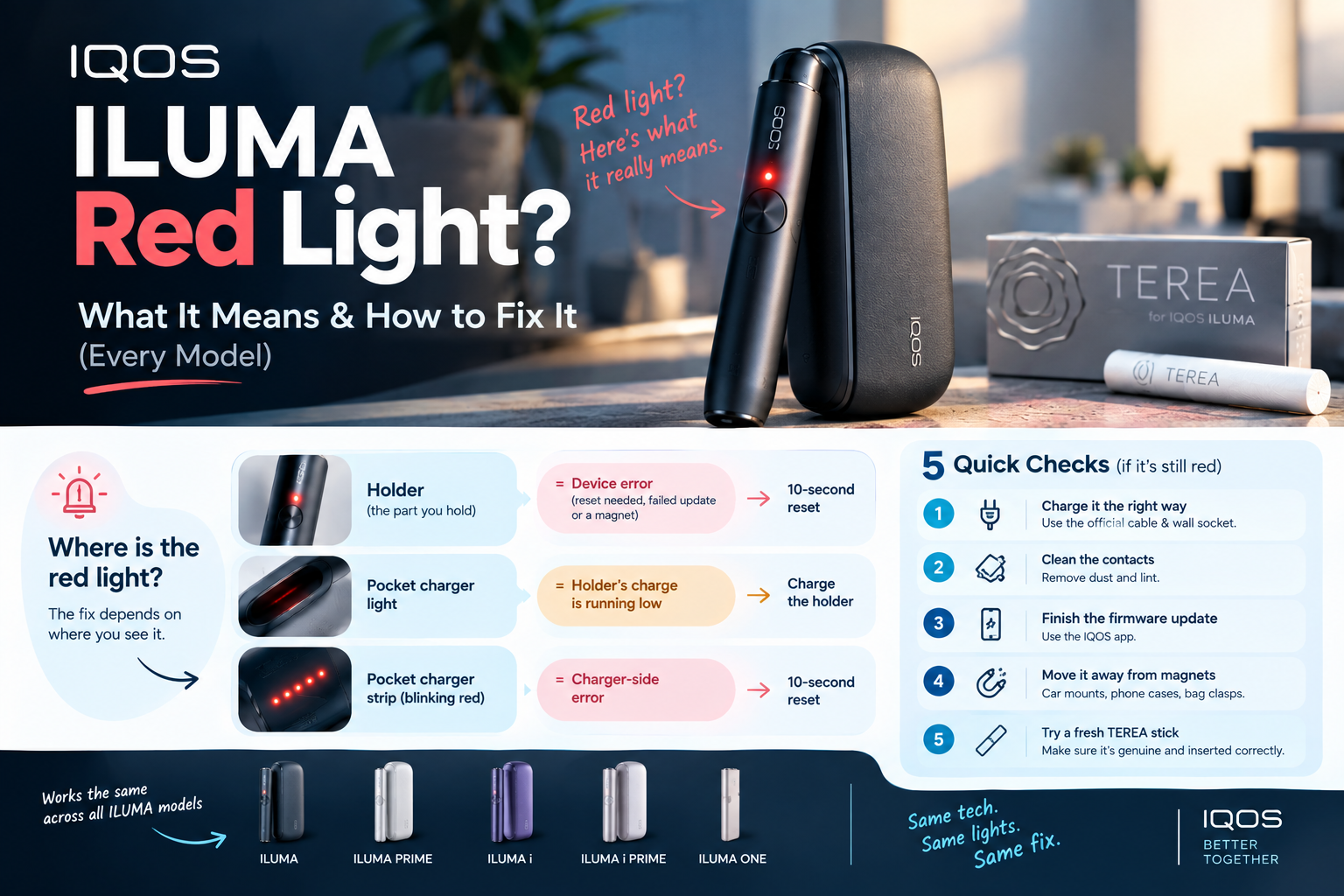
A red light on your IQOS ILUMA holder means the device hit an error it can’t clear by itself. The usual causes are a software glitch, a failed firmware update, or a magnet sitting too close. Put the holder in the pocket charger, hold the button for 10 seconds, and it resets. The same fix works on the newer IQOS ILUMA i Standard.
One catch before you press anything. A red light on the pocket charger means something else. It usually means the holder is low on charge, not broken.
This guide gives you the fix for each model. It also has a five-step check for when the reset doesn’t hold, and it clears up the Dubai heat myth that half the local guides get wrong.
Is the Red Light on Your Holder or Your Pocket Charger?
Look before you touch anything. Where the red light sits decides the fix.
| Where it’s red | What it means | First move |
|---|---|---|
| Holder (the part you hold to your mouth) | Device error: reset needed, failed update, or a magnet | 10-second reset |
| Pocket charger light | The holder’s charge is running low | Charge the holder |
| Pocket charger strip, blinking red | Charger-side error | 10-second reset |
Colour and finish don’t change any of this. The new ILUMA i in Electric Purple follows the same light rules as every other ILUMA i.
What Does Every IQOS ILUMA Light Mean?
Red is only one of five signals. Here’s the full set, based on IQOS’s own support pages.
| Light | Where | Meaning | What to do |
|---|---|---|---|
| Blinking red | Holder | Device problem | Reset |
| Blinking red | Pocket charger | Holder charge is low | Charge |
| Blinking yellow/orange | Holder | Battery needs charging | Charge for about 15 minutes |
| Pulsing white | Holder | Stick is heating, or the session is ending | Nothing |
| Blinking white | Holder | Outside the 0–40°C operating range | Wait at room temperature |
Notice what’s missing. In IQOS’s own guidance, red is never the heat warning.
How Do You Reset an IQOS ILUMA With a Red Light?
It depends on your model. Two-piece models reset through the pocket charger. One-piece models reset through their own button.
ILUMA, ILUMA PRIME, ILUMA i and ILUMA i PRIME
These models have a separate holder and pocket charger, so the reset runs through the charger. That includes the IQOS ILUMA i PRIME.
- Put the holder into the pocket charger and check it sits flat.
- Press and hold the pocket charger button for 10 seconds, then let go.
- All lights switch off, then flash white. That flash confirms the reset.
- Take the holder out and try a fresh stick.
On ILUMA i models, the touch screen goes dark during the reset along with the lights. Don’t let go early.
ILUMA ONE and ILUMA i ONE
There’s no pocket charger here. The IQOS ILUMA i ONE is a single unit, so it resets through its own button.
- Hold the device button for 10 seconds.
- Let go. The lights turn off, blink twice, then come back on.
- If the red light keeps coming back, the user guide says to contact customer support.
Still Red After the Reset? Check These Five Things in Order
Stop resetting. If one reset didn’t hold, the cause is something a reset can’t touch.
Work through these in order. Each takes under two minutes.
1. Charge it the right way. Use the official cable and a wall socket. Laptop charging is slower and less steady.
2. Clean the contacts. Dirty contacts between the holder and charger stop a proper charge. Wipe them with a dry cloth.
3. Finish the firmware update. A failed update is one of IQOS’s listed red-light causes. Open the IQOS app and run the update again, with your phone close to the device.
4. Move it away from magnets. IQOS warns that magnets affect the holder’s calibration. In real life, that means magnetic car phone mounts, magnetic phone cases and bag clasps. [YOUR EXAMPLE: a customer whose red light was caused by a magnetic car mount]
5. Try a fresh stick, pushed in properly. Use genuine TEREA sticks from a sealed pack, pushed in up to the wavy line printed on the filter. TEREA is made only for IQOS ILUMA devices, so older HEETS or third-party sticks don’t belong in it.
Myth vs Reality: What Dubai Guides Get Wrong
Several local guides repeat claims that IQOS’s own pages don’t support. Here are five you’ll run into.
Myth: Dubai heat causes the red light.
Reality: IQOS ties temperature problems to white lights, not red. The full heat question is covered below.
Myth: Imported editions confuse the device.
Reality: Packs sold as TEREA Japan or other regional editions use the same stick format. The flavours, packaging and price change between markets. The way the stick works with the device doesn’t.
Myth: A reset voids your warranty.
Reality: The reset is IQOS’s own first step for a red light. It’s printed in the user guide.
Myth: Menthol or flavoured sticks trigger errors.
Reality: Flavour has nothing to do with the lights. Switching from a classic blend to one of the TEREA Italy options won’t change what the lights mean. What matters is that the stick is genuine, undamaged and fully inserted.
Myth: Clean the chamber with a pin.
Reality: The user guide says to put nothing into the device except TEREA sticks.
Does Dubai Heat Cause the Red Light?
No, not directly. IQOS links heat and cold to white lights, and the device works between 0°C and 40°C.
That range still matters here. Dubai summer afternoons regularly pass 40°C, and a parked car gets much hotter inside. The user guide says not to store the device above 60°C.
So heat triggers the white warning, not the red one. But heat is still hard on any lithium-ion battery over time. A heat-worn battery later shows up as charging trouble, and people blame the wrong thing.
[YOUR EXAMPLE: a customer who came into the Business Bay shop sure the heat had broken their device]
Red Only in Certain Situations? Read the Pattern
When the light appears tells you more than any list of causes. This table is based on practical experience, not official IQOS documentation.
| When it happens | Likely cause | Quick test |
|---|---|---|
| Only in the car | Magnetic phone mount | Keep the holder away from the mount for a day |
| Right after an app update | Firmware update failed | Run the update again |
| Only with one pack | Damaged or non-genuine sticks | Try a stick from a new sealed pack |
| After a drop or spill | Physical damage | Stop using it and contact support |
| Returns within minutes of every reset | Hardware fault | Film it and contact support |
When the Standard Fix Backfires
Some common fixes make things worse. Avoid these four.
Pulling the plug mid-update. Let a firmware update finish before you touch anything. Reset afterwards if you still need to.
Laptop and power-bank charging. Slow, unsteady power leaves the holder half-charged. A half-charged holder looks like a faulty one. Use the wall adapter.
Metal tools for broken sticks. Switch the device off and let it cool. Pull the pieces out with your fingers, or use a wooden toothpick. Never push metal into the chamber.
Resetting ten times. Repeated resets hide the pattern support needs to see. Reset once, and if red returns, note how long it took.
Is My ILUMA Broken? Warranty and Costs in the UAE
Usually not. If one reset clears it and it stays clear, the device is fine.
It’s a real fault if red returns after every reset, the device won’t charge, or it won’t heat a genuine stick. Visible damage counts too.
Warranty: IQOS UAE gives 24 months of cover on ILUMA and ILUMA i devices. It only applies if you register the device within 30 days of purchase.
Not covered: normal wear and ageing, cosmetic damage, misuse, power surges, liquid damage and fire.
Extras once registered: International Assistance for defects while you travel. ILUMA i PRIME also gets Accidental Damage protection.
Before you call: Have your serial number ready. A short video of the red light speeds up the diagnosis.
Cost: A warranty fix is free if the device qualifies. Outside warranty, a replacement device costs [ADD CURRENT TERRA OUTLET PRICES for ILUMA i Standard, ONE and PRIME].
Advanced: A 5-Minute Bench Test for Repeat Red Lights
This section is for readers who have already reset, charged and cleaned, and still see red.
- Remove every variable first. Charge fully from a wall socket. Keep the device at room temperature and away from magnets. Use a stick from a sealed pack.
- Reset once, then time it. Note how many minutes, or how many sessions, pass before red returns.
- Swap parts only between identical models. If a friend owns the exact same model, try your holder in their charger. [CONFIRM: which holders and chargers are cross-compatible] If the red light follows your holder, the holder is the problem.
- Film it. Record 20 seconds: the reset, then the red light returning.
You arrive at support with proof instead of guesses. A timed, filmed result gets a faster decision than a description over the phone.
How to Keep the Red Light From Coming Back
- Charge from a wall socket with the official cable.
- Wipe the contacts [confirm how often].
- Accept firmware updates and let them finish.
- Keep the holder away from magnetic mounts and cases.
- Never leave the device in a parked car.
- Use genuine TEREA only, pushed in to the wavy line.
- Register your device within 30 days of purchase.
Where to Get Help in Dubai
Warranty claims go through IQOS UAE customer care. Terra Outlet doesn’t handle IQOS warranty repairs [confirm with owner].
For advice, a genuine replacement device or a TEREA restock, visit Terra Outlet at Damac Majestine Tower, Ground Floor, Business Bay, or call +971 50 430 6602.
We deliver same-day or next-day across Dubai, including [confirm areas: Downtown Dubai, DIFC, Al Quoz, Jumeirah, Dubai Marina]. Orders also ship to Abu Dhabi, Sharjah, Ajman, Ras Al Khaimah, Fujairah and Umm Al Quwain.
Every product is genuine. Our returns policy covers damaged, defective or incorrect items.
Frequently Asked Questions
1. Why is my IQOS ILUMA blinking red?
The holder has a device error. The usual causes are a needed reset, a failed firmware update, or a nearby magnet. Put the holder in the pocket charger and hold the button for 10 seconds.
2. What does a red light on the ILUMA pocket charger mean?
It means the holder is low on charge. Charge it with the official cable. If the strip light keeps blinking red, do the 10-second reset.
3. How do I reset an IQOS ILUMA i ONE?
Hold its button for 10 seconds. The lights turn off, blink twice and come back on. The ONE has no separate charger to use.
4. Does Dubai heat cause the IQOS ILUMA red light?
No. Heat and cold trigger blinking white lights, and the device works between 0°C and 40°C. Let it return to room temperature, and don’t leave it in a car.
5. Why is my ILUMA still red after a reset?
The cause is something a reset can’t fix. Check charging, contacts, the firmware update, magnets and the stick, in that order. If it’s still red, contact IQOS support.
6. Can a magnet really cause the red light?
Yes. IQOS says magnets affect the holder’s calibration. Magnetic phone mounts and cases are the usual culprits.
7. Is the red light covered by warranty in the UAE?
A genuine device defect is covered for 24 months if you registered within 30 days of purchase. Misuse, liquid damage and normal wear are not covered.
8. Do TEREA sticks from other countries cause errors?
No. Regional editions use the same stick format. Damaged, fake or badly inserted sticks cause problems. The country on the pack doesn’t.
Your Next Step
Do one reset now, following the steps for your model. If red comes back, run the five checks in order, then the bench test, and film the result before you call IQOS support.
And if you haven’t registered your device yet, do it today. It’s the difference between a free fix and paying for a new device.
For adults 18+ only. Heated tobacco products are not risk-free. They contain nicotine, which is addictive.