





TEREA Not Producing Enough Vapor? Causes and Fixes

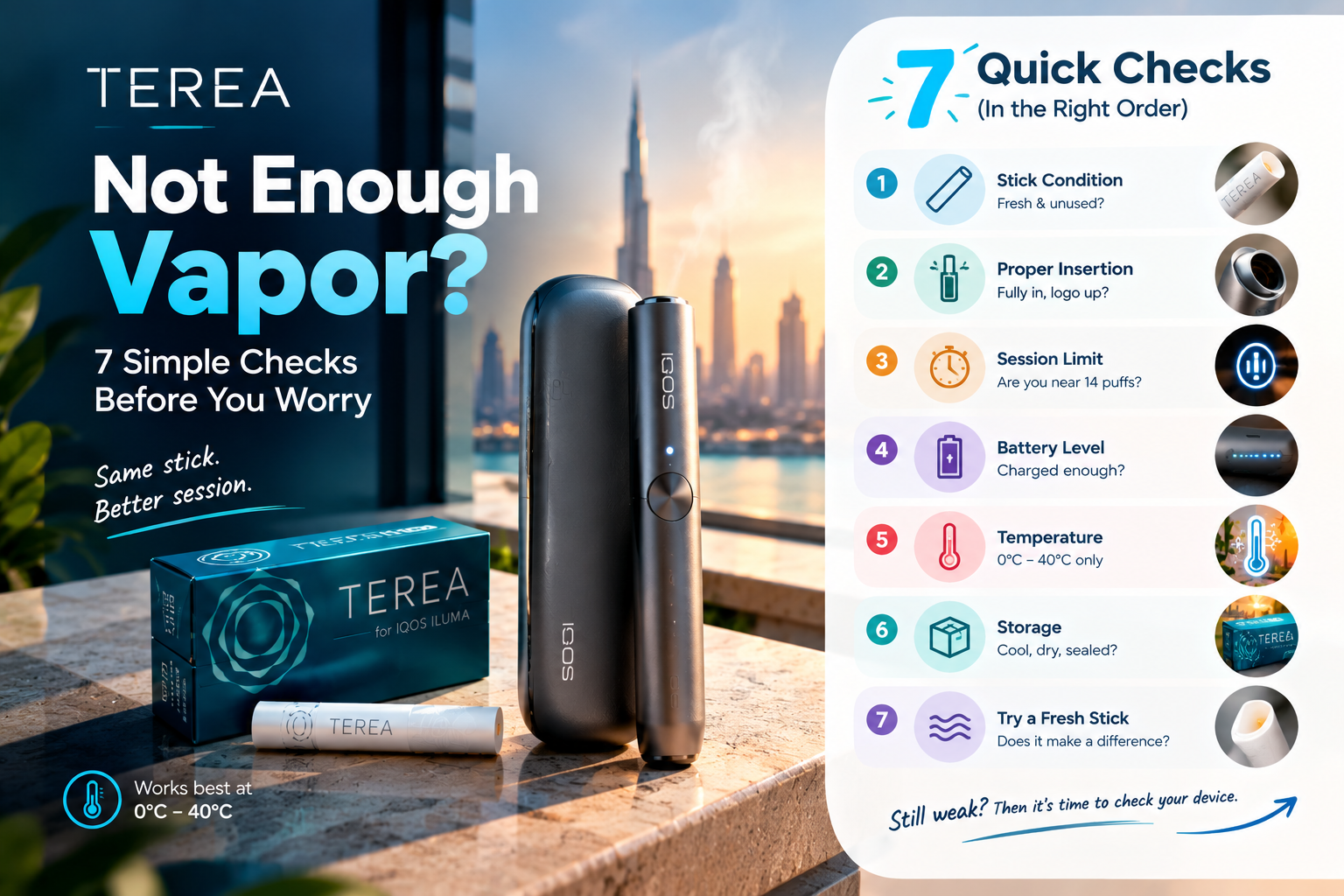
If your TEREA is not producing enough vapor, check the stick, insertion, preheating, battery, temperature, and storage first. A weak session does not automatically mean your IQOS ILUMA is faulty. Official IQOS UAE guidance lists incorrect insertion, used sticks, unsuitable storage conditions and temperature issues among the things to check when TEREA has poor aerosol quality.
Before replacing your device, try the simple checks below. If you need a fresh pack, you can also compare the TEREA tobacco sticks available in Dubai before moving on to device troubleshooting.
Is TEREA vapor weak, or is something else wrong?
“Not enough vapor” can mean different things.
You might see less visible aerosol than usual. The draw might feel lighter. The flavor might seem weak even though the device is heating. Or the session might stop sooner than expected.
Those problems overlap, but they are not identical.
If the vapor is weak across several fresh sticks, start checking the device and its operating conditions. If one stick performs badly while the next one works normally, the stick itself deserves more attention.
That simple distinction can save you from blaming a perfectly working ILUMA.
1. Check that the TEREA stick is inserted correctly
A TEREA stick that sits incorrectly can affect the session.
Remove the stick and check its position. Then insert a fresh TEREA stick according to the instructions for your IQOS ILUMA model. IQOS UAE specifically advises users to make sure the stick is inserted correctly when aerosol quality is poor.
Do not force a stick into the holder.
Do not twist it aggressively after insertion either. A damaged or poorly positioned stick can create another problem while you are trying to solve the first one.
If you use an IQOS ILUMA i Standard, the basic setup is different from older blade-based IQOS devices. You can check the device details in the IQOS ILUMA i Standard guide before troubleshooting.
2. Make sure the TEREA stick is fresh
A used TEREA stick should not be used again.
IQOS states that TEREA sticks are single-use. Its support guidance also recommends trying a new stick from a closed pack when aerosol quality is poor.
This is one of the easiest tests you can run.
Take a fresh stick from a properly closed pack and compare the session with the weak one. If the fresh stick performs normally, the original stick could be the source of the problem.
Do not judge the whole device from one poor-performing stick.

3. Did you start puffing before the device was ready?
This sounds minor, but timing matters.
Official IQOS guidance says the ILUMA system needs time to preheat the stick before aerosol is ready. On supported devices, the readiness signal tells you when heating has reached the required point.
Starting too early can make the first part of the session feel weak.
So try this:
Insert the stick correctly, allow the device to complete its preheating sequence, then start the session when the device indicates that it is ready.
If you recently switched devices, check the model instructions. For example, the IQOS ILUMA i ONE uses an all-in-one design, while the Standard uses a separate Holder and Pocket Charger.
4. Check the battery before blaming the heating system
A low or poorly charged device deserves a quick check.
Place the Holder in the Pocket Charger and confirm that the device has enough charge. Official IQOS support also recommends checking charging contacts when a Holder does not charge correctly.
This does not mean every weak-vapor problem comes from low battery.
The better approach is to remove battery uncertainty from the test. Charge the device properly, then try a fresh TEREA stick again.
For users with an IQOS ILUMA i PRIME, follow the charging and status instructions for that specific model rather than copying advice from an older ILUMA generation.
5. Temperature can change how the device behaves
Your device does not work under every temperature condition.
There is an important detail here: the operating range depends on the specific ILUMA model. Current IQOS UAE support information for the ILUMA diagnostic tool states that the device should be maintained between 0°C and 50°C, while the UAE ILUMA i ONE guide states an ambient operating range of 0°C to 40°C.
So do not copy one temperature number from a random blog and apply it to every ILUMA model.
Check the guide for your exact device.
This matters in Dubai, where a device might sit in a very hot car and then move into strong air conditioning. Give the device time to return to its specified operating range before testing it again.
6. Your TEREA sticks may have been stored badly
Storage affects the stick, not just the taste.
IQOS recommends keeping TEREA in a closed pack and away from humidity, direct sunlight and unsuitable storage conditions. Its UAE support guidance specifically says that packs stored in environments that are too humid or too dry can affect aerosol quality.
Think about where your pack has been.
Was it left in a hot car? Was the pack left open in a humid room? Has it been sitting near direct sunlight?
You do not need a complicated storage setup. Keep the pack closed and store it in a suitable, dry place away from heat and sunlight.
If you have doubts about one pack, compare it with a fresh sealed pack.
7. Are you using TEREA with the correct IQOS device?
TEREA is made for IQOS ILUMA devices that use the SMARTCORE INDUCTION SYSTEM.
IQOS states that ILUMA is designed for TEREA SMARTCORE STICKS and that TEREA should not be used with previous blade-based IQOS generations.
That compatibility point matters more than many quick-fix articles suggest.
For example, if you own an older IQOS generation and assume TEREA works with it because the sticks look similar to older tobacco sticks, that assumption can lead to problems.
Check your exact device before troubleshooting the vapor output.
You can also compare the IQOS ILUMA i Standard, IQOS ILUMA i ONE and IQOS ILUMA i PRIME ranges if you are unsure which model you have.
Could a different TEREA pack be the reason?
Sometimes the easiest test is also the most useful: compare like with like.
TEREA Outlet carries regional lines such as TEREA Uzbekistan, TEREA Italy and TEREA Japan, along with other TEREA collections.
If you recently changed the pack you use, do not immediately assume the ILUMA has developed a fault.
Try a fresh stick from the pack you normally use and compare the result with the new pack. You are trying to isolate the variable, not guess.
That is especially useful when the device behaves normally but one pack seems different.
Should you clean an IQOS ILUMA when TEREA vapor is weak?
This is where a lot of online troubleshooting advice goes wrong.
TEREA uses a sealed SMARTCORE design, and IQOS explains that the stick is designed to keep tobacco residue from entering the Holder in the same way it could with older blade-based systems. Because of that design, routine cleaning should not be treated as the automatic first fix for weak vapor.
There is still a difference between routine cleaning and checking for a problem.
If a TEREA stick breaks or a foreign object enters the chamber, the situation changes. IQOS support advises users to check for a broken stick or debris in relevant troubleshooting cases. Do not push pins, metal tools or other sharp objects into the heating chamber.
In other words, inspect carefully. Do not attack the chamber with a toolkit.
What if the first puff is weak but the rest feels normal?
A weak first puff does not always point to a hardware fault.
Check whether the device had completed its preheating sequence before you started. IQOS says to wait until the device indicates that the stick is sufficiently preheated.
Also look at your puff pattern.
The device needs time between puffs to create aerosol. IQOS guidance recommends allowing a few seconds between puffs rather than taking them continuously without a pause.
Try a normal, steady rhythm during the next session.
What if only one TEREA stick has weak vapor?
Do not replace the device based on one bad session.
IQOS UAE says isolated cases of individual TEREA sticks not fitting properly do occur and are rarely caused by a device fault.
Test another fresh stick from the same closed pack.
If the second stick works normally, the problem may have been limited to the first stick. If several fresh sticks behave the same way, start checking the device, temperature, charging and storage conditions.
That gives you a much cleaner diagnosis.
What if every fresh TEREA stick produces weak vapor?
Now the pattern matters.
If several fresh sticks from a properly stored pack all perform poorly in the same device, stop testing random variables one at a time forever. Check the battery, temperature, insertion and device status again, then use the official diagnostic or support route.
IQOS UAE provides a diagnostic tool for ILUMA problems and gives specific reset instructions for certain Holder or Pocket Charger issues.
A persistent problem deserves a proper diagnosis rather than endless cleaning, reinserting and hoping for a miracle.
A simple 5-minute TEREA weak-vapor test
Use this order:
| Check | What to do |
|---|---|
| 1. Stick | Use a fresh TEREA stick |
| 2. Insertion | Insert it correctly and keep it steady |
| 3. Preheating | Wait until the device says it is ready |
| 4. Device | Check battery and operating temperature |
| 5. Storage | Confirm the pack was kept closed and away from poor conditions |
If the fresh stick works, you probably do not need to replace the device.
If multiple fresh sticks still produce weak aerosol after these checks, move to the model-specific IQOS support process.
How to prevent weak TEREA vapor from coming back
The best troubleshooting routine starts before the problem appears.
Keep TEREA packs closed when you are not using them. Store them away from direct sunlight and unsuitable humidity. IQOS specifically recommends cool, dry storage conditions and protection from humidity and direct sunlight.
Use only compatible TEREA sticks with your ILUMA.
Do not reuse a stick, and do not force one into the Holder.
Most of all, learn the normal behavior of your own device. Once you know how long preheating takes, what the normal lights look like and how a fresh stick performs, an unusual session becomes much easier to spot.
When should you get your IQOS ILUMA checked?
Get official support when the problem continues after basic checks.
That is especially true when several fresh TEREA sticks behave the same way, the device shows warning lights, charging remains abnormal, or the session repeatedly fails despite correct use.
Do not start taking the Holder apart yourself.
IQOS UAE provides model-specific troubleshooting, support and warranty information, so use those resources when the simple checks do not solve the problem.
For Dubai customers, Terra Outlet also provides product information and support for its listed TEREA and IQOS ILUMA range.
Frequently Asked Questions
Why is my TEREA not producing enough vapor?
Weak TEREA vapor can come from incorrect insertion, a used or poorly stored stick, incomplete preheating, unsuitable temperature conditions, or a device issue. Start with a fresh stick and check insertion, preheating, battery and storage before assuming the device is faulty.
Can humid TEREA sticks produce less vapor?
Yes. IQOS states that TEREA packs stored in environments that are too humid or too dry can affect aerosol quality. Keep the pack closed and away from unsuitable humidity and direct sunlight.
Does low battery cause weak TEREA vapor?
A low or poorly charged device should be checked when performance is abnormal, but weak vapor is not automatically proof of a battery problem. Charge the device properly and test again with a fresh stick before drawing a conclusion.
Should I clean my IQOS ILUMA if the vapor is weak?
Do not treat routine cleaning as the first fix for every weak-vapor problem. TEREA uses a sealed design intended to keep tobacco residue out of the Holder. Check the chamber for broken-stick debris when relevant, but do not insert sharp or metal objects into it.
Why is my first TEREA puff weak?
Check the preheating sequence first. IQOS guidance says to begin puffing after the device indicates that the stick has been sufficiently preheated.
Can temperature affect IQOS ILUMA?
Yes. The specified operating range depends on the model. Current IQOS UAE information lists different ranges for different ILUMA devices, so check the guide for your exact model instead of applying one number to every device.
What should I do if one TEREA stick has weak vapor but others work?
Try another fresh stick. IQOS UAE notes that isolated stick-fitting problems can occur and are rarely caused by a device fault.
When should I contact IQOS support?
Contact support when multiple fresh sticks still perform poorly after you have checked insertion, preheating, temperature, battery and storage, or when the device shows persistent warning indicators.
Final Takeaway
Do not replace your IQOS ILUMA just because one TEREA session feels weak.
Start with the stick. Then check insertion, preheating, battery, temperature and storage. If the same problem continues across multiple fresh sticks, stop guessing and use the device-specific support process.
For adult UAE customers who need a fresh pack, Terra Outlet provides TEREA and IQOS ILUMA products for Dubai and wider UAE delivery.