




IQOS ILUMA AutoStart Not Working? Causes and Fixes

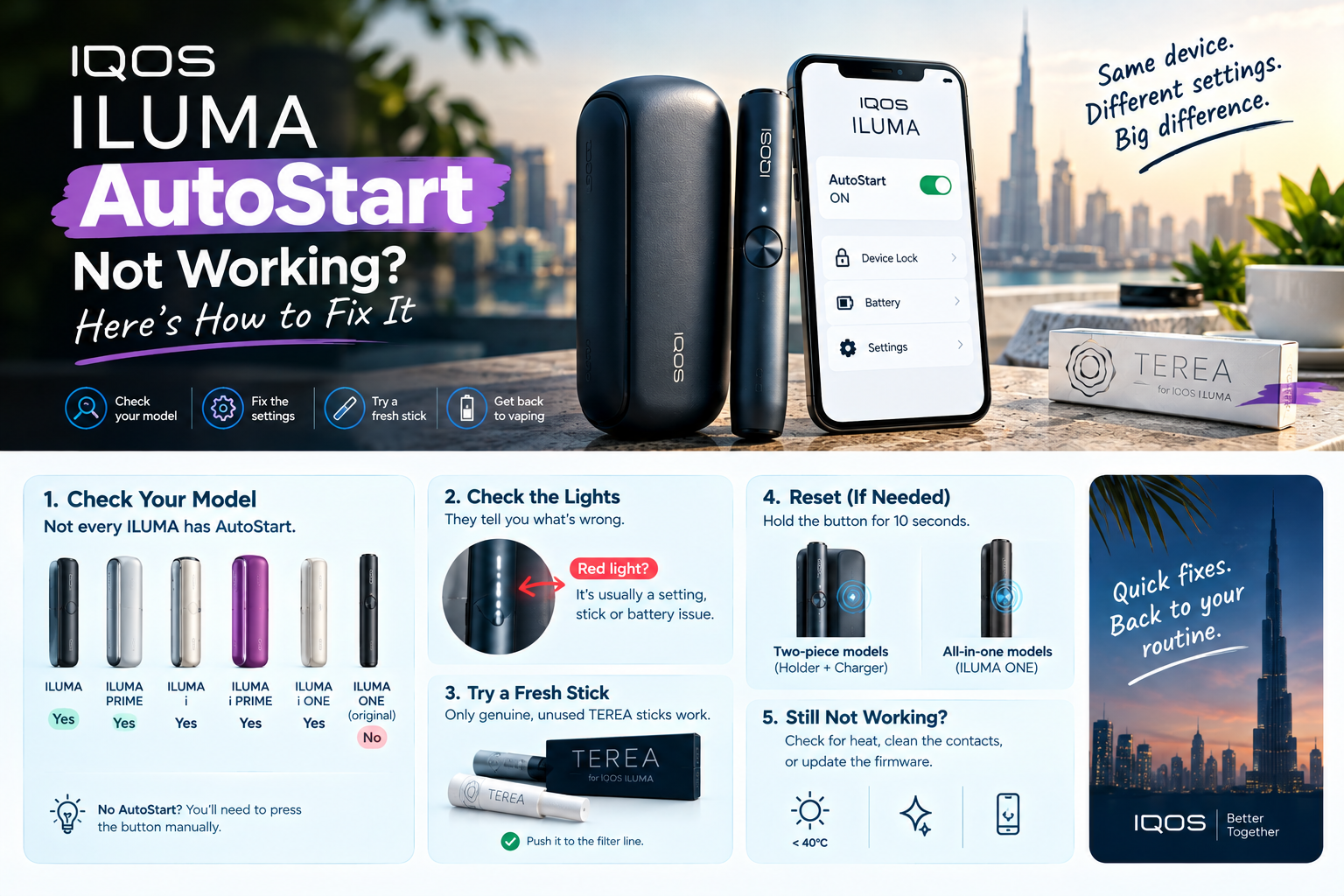
If your IQOS ILUMA AutoStart is not working, don’t assume the device is dead. Check your model first. The original ILUMA ONE never had AutoStart, so on that one you press the button. On every other ILUMA, the cause is almost always a setting, the stick, the battery or the heat.
IQOS ILUMA AutoStart usually fails because your model doesn’t have it (the original ILUMA ONE), AutoStart or Device Lock is switched on or off in the IQOS app, the stick isn’t a genuine, unused TEREA pushed to the filter line, the battery is low, or the device is outside 0–40°C.
Does your ILUMA model even have AutoStart?
Five of the six ILUMA models do. The original ILUMA ONE doesn’t. Check this before anything else, because no reset will add a feature your device never had.
| Model | AutoStart? | Start it manually | Reset with |
|---|---|---|---|
| ILUMA | Yes, on by default | Press the holder button (1–2 seconds) | Pocket charger button |
| ILUMA PRIME | Yes, on by default | Press the holder button (1–2 seconds) | Pocket charger button |
| ILUMA ONE (original) | No | Hold the button about 1 second until it vibrates | Device button |
| ILUMA i | Yes, on by default | Swipe up on the touch screen | |
| ILUMA i PRIME | Yes, on by default | Swipe up on the touch screen | |
| ILUMA i ONE | Yes (AutoStart and AutoStop) | Press the button | Device button |
IQOS says it plainly on its own store page. The ILUMA i ONE added AutoStart and AutoStop, which the older ILUMA ONE lacks (IQOS UK, IQOS Italy).
So if you own an original ONE and want sticks to start on their own, the IQOS ILUMA i ONE is the all-in-one model that does it. Some UAE guides still troubleshoot “ILUMA ONE AutoStart” as if it exists. It doesn’t.
Not sure which model you own? Check the box, or open the IQOS app and look at your device list.
[ADD PHOTO: where the model name or code sits on each device]
A small touch screen on the holder is the quickest clue. That means you have an ILUMA i Standard or an ILUMA i PRIME, and you get extra screen signals that make the next step much easier.
What is your ILUMA telling you? A 60-second symptom check
Your device almost always tells you what’s wrong. Match what you see to the table, then jump to the fix.
| What you see | What it means | Do this first |
|---|---|---|
| Stick in, no vibration, no lights | AutoStart off, low battery, or stick not detected | Try a manual start; if that works, it’s the setting or the stick |
| ILUMA i screen: three horizontal lines wave three times | AutoStart is switched off | Turn AutoStart on in the IQOS app |
| ILUMA i screen: a horizontal line with a circle under it | Device Lock is on | Turn Device Lock off in the IQOS app |
| ILUMA i ONE: top and bottom lights flash white on a button press | Device Lock is on | Turn Device Lock off in the IQOS app |
| ILUMA ONE: all lights blink white twice, then go off | Outside 0–40°C | Move it to room temperature |
| ILUMA ONE: blinking yellow | Battery low | Charge it |
| ILUMA ONE: blinking red | Error | Reset it |
| Holder heats with nothing inside | Glitch | Reset, then switch AutoStart off if it repeats |
Sources for these signals: IQOS Maldives, IQOS Saudi Arabia, IQOS Cyprus and IQOS Italy.
The screen icons only show on touch-screen models such as the IQOS ILUMA i PRIME. On the others, you read lights and vibration instead.
One rule saves a lot of guessing. If a manual start works but AutoStart doesn’t, the heater is fine. The problem is a setting or how the stick sits.
8 reasons ILUMA AutoStart stops working, and the fix for each
Work down this list in order. The first four take seconds and need no tools.
1. Is AutoStart switched off in the IQOS app?
This is the first suspect if someone else set up your device, or you tapped around in the settings. AutoStart comes on by default and works without the app. The app is simply where it gets turned off by accident .
- Open the IQOS app or the IQOS web app.
- Pick your device.
- Go to device settings.
- Switch AutoStart on.
2. Is Device Lock on?
Only the ILUMA i range has this. A locked device won’t start at all, with AutoStart or with the button.
Open the IQOS app, go to device settings, find “Lock device” and switch it off. Colour editions like the ILUMA i in Electric Purple use the same menu.
3. Is it a genuine, unused TEREA stick?
ILUMA only starts with SMARTCORE sticks: TEREA, LEVIA or DELIA. Used sticks won’t start it, and neither will HEETS from older IQOS devices.
Here’s why that matters. ILUMA heats a small metal core sealed inside each stick, and it has to detect that core before it starts. A fake that looks perfect on the outside still fails if the inside isn’t right.
What about imported TEREA editions?
Regional packs are still TEREA. Terea Outlet stocks editions such as TEREA Japan, and they’re made for ILUMA like any other TEREA.
The two-pack test
If one pack starts and another doesn’t, the device isn’t your problem. The pack is.
Check that it was sealed, the sticks aren’t bent or crushed, and it wasn’t stored somewhere very humid or very dry. IQOS warns that storage affects the sticks.
Switched editions recently, say from your usual pack to TEREA Swiss? Try one stick from the old pack. If it starts, you’ve found your answer.
4. Did the stick go in the wrong way, or not far enough?
The stick has a line on the filter. Push it in up to that line, with the printed part facing out .
Use one smooth push. Don’t twist it, and don’t force it past the line.
5. Is the battery too low?
On two-piece sets, the pocket charger needs at least one solid white light before it can charge the holder. On the ILUMA ONE, blinking yellow means charge it now.
A fully drained device can take up to 10 minutes on the cable before any light shows. Give it that time before you decide it’s dead.
6. Is your ILUMA too hot, or too cold?
ILUMA works between 0°C and 40°C. Outside that range, a session may not start or may stop halfway .
Too cold is rare in Dubai, but it happens in a freezing car or a very cold office. IQOS suggests warming the device in your hand for a minute. Too hot is the real UAE problem, and it gets its own section below.
7. Did the software glitch? Reset it the right way for your model
A reset clears small errors. The steps differ by model, so pick yours.
ILUMA and ILUMA PRIME (two-piece)
- Put the holder in the pocket charger.
- Hold the pocket charger button for about 10 seconds, until the lights fade out.
- Let go. All lights blink twice to confirm.
ILUMA ONE (original)
Hold the device button until the lights go out, then let go. The lights flash and the device vibrates. IQOS pages disagree on the timing (7 or 10 seconds), so watch the lights, not the clock.
ILUMA i ONE
Hold the button for 10 seconds. The lights fade in, blink twice fast, then show the charge level.
ILUMA i and ILUMA i PRIME
Hold the ON/OFF button for 10 seconds, until the lights fade out, fade back in and blink twice (IQOS UK). [VERIFY: confirm which button on the UAE user manual.]
8. Is the firmware out of date?
Open the IQOS app and install any update waiting for your device. IQOS lists this as a step when other fixes fail (IQOS UK).
Button start works but AutoStart doesn’t? Use the 4-test method
This section is for readers who’ve already tried the basics. Change one thing at a time, and the fault shows itself in about five minutes.
- Test one: a fresh stick from a sealed pack you trust, started manually.
- It heats? The heater and battery are fine. Go to test two.
- It doesn’t? Charge fully at room temperature, check Device Lock, reset. Still nothing? Skip to test four.
- Test two: the same stick with AutoStart switched on, inserted slowly to the filter line.
- It starts? The cause was the setting or the insertion. Done.
- It doesn’t? Go to test three.
- Test three: a stick from a different pack.
- It starts? Your first pack is the problem.
- It doesn’t? Update the firmware, reset once more, then try again.
- Test four: write it down and get help. Note the model, what you saw, the temperature and which tests failed.
That note matters. IQOS says registered devices get identified and serviced faster, and a clear test log saves you a second visit.
Myth vs reality: ILUMA advice that doesn’t hold up
A lot of ILUMA advice online was written for older IQOS devices. Some of it is simply wrong for ILUMA.
| Myth | Reality |
|---|---|
| “My ILUMA ONE’s AutoStart is broken.” | The original ILUMA ONE never had AutoStart. You press the button. |
| “Clean the chamber with a cleaning tool after every pack.” | IQOS says ILUMA uses bladeless induction and doesn’t need internal cleaning like older models. Keep the USB ports dust-free and wipe the contacts with a dry cloth. |
| “A red light means the device is dead.” | On the ILUMA ONE, blinking red means “reset me” . |
| “HEETS will do in a pinch.” | HEETS have no metal core, so ILUMA can’t detect or heat them. |
| “You need the app for AutoStart.” | AutoStart works straight out of the box. The app only switches it on or off. |
| “Push the stick deeper for better contact.” | Stop at the filter line. Going further doesn’t help it start. |
The cleaning myth is the one we’d flag hardest. Poking tools into a bladeless chamber solves nothing and risks damage.
Should you just switch AutoStart off?
Sometimes, yes. IQOS itself tells owners to switch AutoStart off if the holder starts heating without a stick, even after a reset.
| Keep AutoStart on if… | Switch it off if… |
|---|---|
| Your device behaves normally | The holder heats with no stick inside, again and again |
| You like one-step use | You want full control over when a session starts |
| You rarely have start-up problems | You’re testing faults and want one less variable |
The cost of switching it off is small: one press of the button (1–2 seconds) each time. On ILUMA i PRIME and ILUMA i, a swipe up on the screen does the same job.
When “not working” is actually normal: Pause, AutoStop and session end
Some of what owners report as failures is the device doing its job. Rule these out before you reset anything.
| Looks like a fault | What’s actually happening |
|---|---|
| Session stops early on an ILUMA i | You may have paused it. ILUMA i models have a Pause feature [VERIFY: how Pause shows on each model]. |
| ILUMA i ONE ends the session on its own | AutoStop is part of the ILUMA i ONE’s feature set. |
| One vibration and one light pulsing on an ILUMA ONE | The session is nearly over: 30 seconds or 2 puffs left . |
| A reused stick won’t start | Correct behaviour. ILUMA is built to refuse used sticks. |
One more quirk on the ILUMA i ONE: FlexPuff may add 4 extra puffs within the 6-minute session, depending on how you use it. So session length isn’t always the same, and that’s by design.
Bought your ILUMA abroad? Why UAE support may not recognise it
This catches a lot of Dubai residents and visitors. IQOS says some models are country-specific, so a device bought in another country may not appear in the local troubleshooting list.
Warranty is tied to where you bought it, too. IQOS UK, for example, states its ILUMA i warranty from the date of purchase “in your country”.
- Keep your receipt and the box.
- Register the device in the IQOS app where your market allows it.
- Check IQOS’s international assistance page before you travel with a faulty device.
- For devices bought from a UAE shop, contact that shop first. They know the model and the stock.
Is Dubai’s summer heat stopping your ILUMA?
In July and August, yes, it’s a real cause. ILUMA’s upper limit is 40°C, and Dubai’s average daytime highs in those months sit around 40–41°C.
The numbers: ILUMA operating range: 0–40°C (IQOS). Dubai average high in July and August: about 40–41°C, with recent records near 49°C (Holiday Weather, Weather & Climate).
That means an ordinary afternoon outside is already at the edge. A few habits push it over.
Three places ILUMA overheats in the UAE
- A parked car. Left on the seat or dashboard, it sits in air hotter than the street.
- A beach bag at JBR or Kite Beach. Direct sun on a dark bag adds up fast.
- A terrace table. Business Bay and Downtown terraces look shaded, but the afternoon sun moves.
What to do in summer
Keep the device in a pocket or a bag in the shade. If it refuses to start, take it indoors and let it cool to room temperature, then try a fresh stick.
Skip the fridge and the AC vent. Let it cool on its own.
ILUMA help in Business Bay and across the UAE
Terea Outlet runs a shop at Damac Majestine Tower, Ground Floor, Business Bay. It’s a short trip from Downtown Dubai, DIFC, Al Safa and Jumeirah, and within easy reach of Dubai Marina and JLT.
Online orders go out with same-day or next-day delivery in Dubai. [CONFIRM order cut-off time] Delivery also covers Abu Dhabi, Sharjah, Ajman, Ras Al Khaimah, Fujairah and Umm Al Quwain.
What does fixing ILUMA AutoStart cost?
Usually nothing. A setting, a reset, a fresh genuine stick or some shade fixes most cases.
If the device is faulty, check your warranty with IQOS UAE support first.
How do you keep AutoStart working?
A few habits prevent most repeat problems.
- Buy sealed packs and store them away from damp or very dry places.
- Charge the pocket charger every day.
- Install firmware updates when the IQOS app offers them.
- Keep the device out of cars and direct sun from May to September.
- Blow dust out of the USB port gently, and wipe the holder and charger contacts with a soft, dry cloth (IQOS UK).
- Insert every stick in one smooth push, up to the filter line.
When should you get your ILUMA checked in Dubai?
Stop troubleshooting when the fixes above fail with a genuine stick, a full charge and a room-temperature device. The same goes for a red light that keeps coming back after resets, or a device that was dropped or got wet.
For warranty help, contact IQOS UAE support or visit an official IQOS store. If you bought the device from Terea Outlet, call +971 50 430 6602 or visit the Business Bay shop. Eligible defective items can be reported under the store’s returns policy.
Why Dubai customers choose Terea Outlet
Terea Outlet sells genuine IQOS ILUMA devices, authentic TEREA sticks and accessories, from a real shop in Business Bay with a matching UAE phone number.
You get secure payment, a published returns policy and after-sales help. Dubai orders arrive same-day or next-day, and delivery reaches all seven emirates. [YOUR DETAIL: a real customer quote, with permission]
Fixed it, or still stuck?
Fixed it? Keep your ILUMA running on genuine, sealed TEREA. Order online for fast Dubai delivery, or pick up at our Business Bay shop. [BUTTON: Shop TEREA]
Still not starting after every step? Call or WhatsApp us on +971 50 430 6602, or browse the ILUMA i range, where every model has AutoStart. [BUTTON: See ILUMA i devices]
IQOS ILUMA AutoStart FAQs
Why won’t my IQOS ILUMA start automatically in Dubai’s summer?
IQOS rates ILUMA for 0–40°C, and Dubai’s July and August average highs sit around 40–41°C. A device left in a parked car or on a sunny terrace passes that limit and refuses to start. Take it indoors, let it return to room temperature, then insert a fresh TEREA stick.
Does the IQOS ILUMA ONE have AutoStart?
The original ILUMA ONE does not. You insert a TEREA stick and hold the button for about a second until it vibrates. The newer ILUMA i ONE does have AutoStart and AutoStop. Check your box or the IQOS app to confirm your model before you troubleshoot a missing feature.
How do I turn AutoStart back on for my ILUMA?
AutoStart is on by default. If it was switched off, open the IQOS app, choose your device, go to device settings and turn AutoStart on. On ILUMA i models, check that Device Lock is off in the same menu, because a locked device won’t start at all.
Can fake TEREA sticks stop ILUMA AutoStart from working?
Yes. IQOS says ILUMA only starts with genuine SMARTCORE sticks, and it needs to detect the metal core inside the stick first. If AutoStart works with one pack and not another, suspect the sticks. Buy sealed packs from a seller in Dubai that guarantees genuine stock.
Why does my ILUMA heat up with no stick inside?
That’s a glitch, not a feature. Reset the device first. If it keeps happening, IQOS recommends switching AutoStart off in the IQOS app. After that, you start each session with a short button press, or a swipe up on the ILUMA i touch screen.
How do I reset my IQOS ILUMA?
On two-piece sets, put the holder in the pocket charger and hold the charger button for about 10 seconds, until the lights fade. Let go, and the lights blink twice. On ILUMA ONE and ILUMA i ONE, hold the device button until the lights go out, then release.
Can I use HEETS in an IQOS ILUMA?
No. ILUMA heats a metal core sealed inside SMARTCORE sticks such as TEREA, and HEETS don’t have one. The device won’t detect them, so it won’t start. IQOS also warns against putting TEREA sticks into older IQOS devices, because that can damage them.
Where can I get my ILUMA checked in Dubai?
For warranty help, contact IQOS UAE support or visit an official IQOS store. If you bought the device from Terea Outlet, call +971 50 430 6602 or visit the Business Bay shop at Damac Majestine Tower. Eligible defective items can be reported under the store’s returns policy.
Your next step
Do this now: take a stick from a sealed pack, insert it to the filter line and press the button.
If it heats, open the IQOS app and check AutoStart and Device Lock. If it doesn’t, charge it indoors until at least one light turns solid white, then try again. Still nothing after the 4-test method? Bring your notes and the device to an IQOS store, or call Terea Outlet if you bought it from us.
These products are for adults 18+ only. They are not risk-free and contain nicotine, which is addictive.