




Why Is My IQOS ILUMA Not Charging? 7 Causes & Fixes

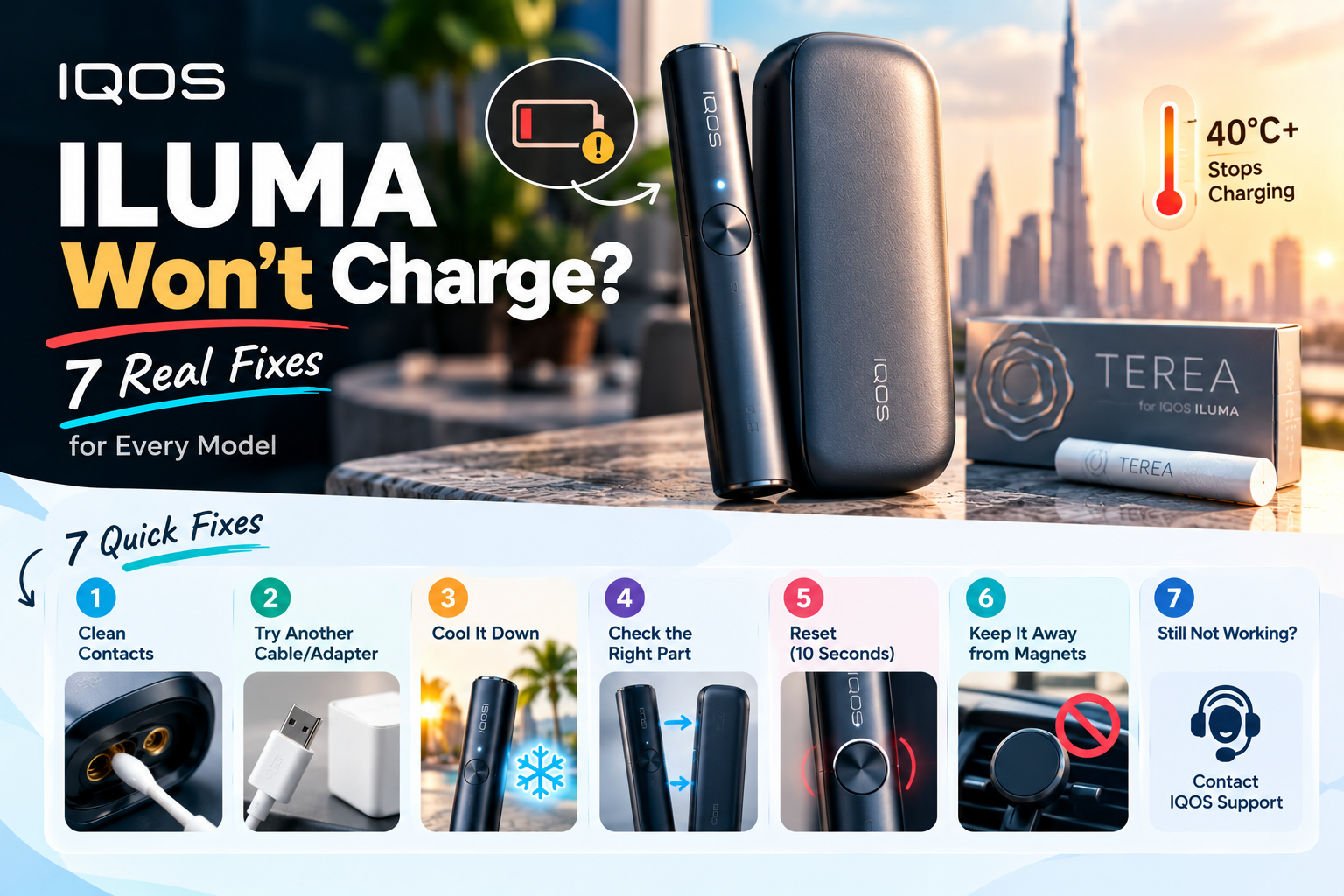
Your ILUMA isn’t broken just because it won’t charge. Most of the time, the cause is dirt on the contacts, a tired cable, heat above 40°C, a frozen system, or a Holder that’s simply empty. This guide covers every model, from the original ILUMA to the newer IQOS ILUMA i PRIME.
An IQOS ILUMA usually stops charging because of dirty contacts, a faulty cable or adapter, heat above its 40°C limit, a Holder that isn’t seated, or a software freeze. Clean the contacts, swap the cable, let it cool indoors, then hold the button for 10 seconds to reset it.
Live in Dubai? Check heat first. IQOS devices work between 0°C and 40°C, and UAE average highs in July run from 39.7°C to 43.8°C (NCM via Gulf News).
That overlap explains a lot of summer “faults.”
What are your ILUMA’s lights telling you?
Your lights already know what’s wrong. Match the pattern below to the cause before you touch anything else.
| What you see | Where | What it means | Do this first |
|---|---|---|---|
| Blinking white | Pocket Charger | Outside 0–40°C | Move it indoors, let it cool |
| Blinking red | Pocket Charger | Holder battery low | Hold the button 10 seconds to reset |
| Blinking red | Holder | Needs a reset, or a magnet is nearby | Reset; move it away from magnets |
| Blinking yellow/orange | Any | Battery needs charging | Charge for 15 minutes |
| Pulsing white round lights | Pocket Charger | Holder is charging | Leave it alone |
| No lights at all | Any | Battery fully drained | Plug in, wait about 15 minutes |
| Top and bottom lights flash white | ILUMA i ONE | Device Lock is on | Turn off Lock device in the IQOS app |
Which ILUMA do you have? It changes the fix
There are two designs, and they fail in different ways. Know yours before you follow any step below.
Two-piece models: the original ILUMA, ILUMA PRIME, the IQOS ILUMA i Standard and ILUMA i PRIME. A Holder heats the stick. A Pocket Charger refills the Holder. That’s two batteries, and two places a fault can hide.
All-in-one models: ILUMA ONE and ILUMA i ONE. No separate Holder. One battery, one charging port.
Colour makes no difference. A purple ILUMA i charges exactly like a black one, so skip any advice that treats special editions differently.
The stick doesn’t matter either. Every ILUMA runs on TEREA sticks, and the flavour you pick has zero effect on charging.
Holder or Pocket Charger? A 2-minute test to find the failing part
This test is for two-piece models only. A single tired part can make the whole kit look dead. [YOUR EXAMPLE: a customer who thought the kit was dead but only the Holder needed a reset]
- Check the Pocket Charger’s own battery first. On the original ILUMA, the strip lights show the Pocket Charger and the round lights show the Holder.
- Pocket Charger charges, Holder doesn’t? The Holder or its contacts are the problem. Clean them and reseat the Holder.
- Nothing lights up while plugged in? Suspect the cable, the adapter or the USB-C port, not the Holder.
- Holder dies after two sticks? That’s normal. A Holder gives 2 back-to-back sessions, and the Pocket Charger holds about 20. Two TEREA Japan sticks in a row, and it needs to go back in the charger.
- Still no response? Put the Holder inside and do the 10-second reset.
7 reasons your IQOS ILUMA won’t charge
Work down this list in order. The first three are the quickest and cheapest to check.
1. Dirt or fluff on the contacts or USB-C port
Pocket lint and sand block the contact. Switch the device off, blow gently on the contacts, and wipe them with a dry cotton bud or soft cloth (IQOS). Never use water or anything sharp.
[IMAGE: Close-up of Pocket Charger contacts. Alt: “Charging contacts inside the IQOS ILUMA Pocket Charger”]
2. The cable or plug is the real culprit
Test your cable on your phone. If the phone charges slowly too, you’ve found the problem. IQOS asks you to use a compatible power adapter and cable, and a frayed one fails long before the device does.
3. It’s too hot
Above 40°C, the device refuses to charge and the Pocket Charger blinks white. In a Dubai summer, check this first. Leaving a spare pack of TEREA Swiss and your device in the glovebox is the classic mistake. More on heat below.
4. The Holder isn’t seated, or a magnet is nearby
Push the Holder fully into the Pocket Charger until it sits flat. Then check your phone case. IQOS warns against keeping the Holder near magnets, and magnetic cases and car vent mounts sit right next to it all day.
5. The system froze
A frozen device looks dead but isn’t. Hold the button for 10 seconds to reset it (full steps below).
6. Device Lock is switched on
On the IQOS ILUMA i ONE, flashing top and bottom lights mean the device is locked. Open the IQOS app, go to Device settings, and turn off Lock device (IQOS).
7. The battery is worn out or damaged
A battery that empties fast after a full charge is ageing. The advanced section below shows you how to prove it before you spend money.
How do I fix an ILUMA that won’t charge? Step by step
Start with the free, fast fixes. Steps 1 to 4 cost nothing and take under 10 minutes.
- Match the lights to the table above.
- Move the device indoors and let it cool to room temperature.
- Try a different cable and a wall adapter.
- Clean the contacts and port with a dry cotton bud.
- Reseat the Holder (two-piece models only).
- Reset: hold the button for 10 seconds.
- Charge it untouched for 15 minutes before you judge it.
How to reset ILUMA, ILUMA PRIME and ILUMA i models
Put the Holder inside the Pocket Charger. Hold the Pocket Charger button for 10 seconds. The lights fade out, fade back in, and the device vibrates when the reset is done. The steps are identical on every colour, from black to the ILUMA i in Electric Purple.
Why does it fail right after you come in from the Dubai heat?
Your room cools down in minutes. The device doesn’t. The battery and circuit board stay hot well after you step into the AC, so the blinking white light keeps going even though you feel fine.
Two cooling tricks make it worse. The fridge adds moisture as the device warms back up, and moisture near a charging port is a real risk. Holding it against an AC vent does the same thing on a smaller scale.
Car charging adds its own problem. Car USB ports vary a lot in output, so test at home on a wall adapter before you blame the device.
Summer checklist for UAE owners:
- Keep the device in your bag, not on the dashboard or a balcony table
- Wait until it feels room temperature before you plug it in
- Skip magnetic vent mounts in the car
- Charge indoors, overnight, on a wall adapter
[YOUR EXAMPLE: how many “won’t charge” devices come into the Business Bay store in July and August versus winter]
Myth vs reality: 6 charging “fixes” that waste your time
Some advice online comes from older IQOS models. Here’s what holds up for ILUMA.
| Myth | Reality |
|---|---|
| “Cool it in the fridge.” | Moisture forms as it warms up. Cool it in an air-conditioned room. |
| “Any USB-C cable works.” | IQOS asks for a compatible cable and adapter, and its UAE warranty doesn’t cover either. |
| “Blinking red means the charger is broken.” | On the Pocket Charger, it means the Holder battery is low. Reset it. |
| “No lights means it’s dead.” | A fully drained battery takes about 15 minutes to show lights. |
| “Resetting will damage it.” | Reset is one of IQOS’s own first fixes. |
| “The warranty covers everything in the box.” | It covers the Holder and Pocket Charger, only if registered within 30 days. |
Is the battery really dying? Measure it before you buy (advanced)
Skip this section if the steps above fixed it. It’s for owners who suspect battery wear and want proof instead of a guess.
Start with the official baselines. Your device should get close to these numbers when healthy.
| Device | Uses per full charge | Full charge time |
|---|---|---|
| ILUMA ONE | 20 back-to-back sessions | 1 h 30 min |
| ILUMA / ILUMA PRIME Holder | 2 back-to-back sessions | — |
| ILUMA / ILUMA PRIME Pocket Charger | About 20 uses | 2 h 15 min |
| ILUMA i ONE | — | About 90 min |
Then run a 3-day log:
- Charge to full on a known-good cable and wall adapter. Time it.
- Count sessions until the device is empty.
- Repeat for three days and average the numbers.
Read the result like this. Sessions well below baseline plus a longer charge time point to battery wear. Normal sessions but no charge on some days point back to the cable, port or contacts.
Before you pay for anything, check your purchase date. A Holder or Pocket Charger inside its warranty period shouldn’t cost you anything to replace.
Warranty, returns and grey imports: who fixes what in the UAE?
The cable is the cheapest part to replace, and it’s the one part no warranty covers. Know who handles what before you call anyone.
| Problem | Who handles it |
|---|---|
| Holder or Pocket Charger fault, device registered within 30 days | IQOS UAE: 24-month warranty |
| Charging cable or power adapter | Not covered; buy a replacement |
| Device bought outside the UAE | Not covered here; warranty only works in the country of purchase |
| Damaged or defective item bought from TEREA OUTLET | TEREA OUTLET, under its returns policy |
Stop charging right away if the device is swollen, cracked, hot while idle, smells burnt, or got wet. Unplug it, don’t open it, and contact IQOS UAE or the store you bought it from.
Why UAE ILUMA owners buy from TEREA OUTLET in Business Bay
We sell genuine IQOS ILUMA devices, TEREA sticks and accessories. You can visit our shop at Damac Majestine, Ground Floor, Business Bay, or order online.
Dubai orders arrive same day or next day. We also deliver to Abu Dhabi, Sharjah, Ajman, Ras Al Khaimah, Fujairah and Umm Al Quwain. Close to Business Bay? Downtown Dubai, DIFC and Al Safa are a short trip away.
Our published returns policy covers damaged, defective or incorrect items. Questions? Call or WhatsApp +971 50 430 6602. Sales are for adults 18+ only.
[YOUR EXAMPLE: one real customer story, shared with permission]
Frequently asked questions
Why is my IQOS ILUMA not charging when plugged in?
The most common causes are dirty contacts, a faulty cable or adapter, and heat above 40°C. Clean the contacts with a dry cotton bud, try a different cable and wall adapter, and let the device cool indoors. If it still won’t charge, hold the button for 10 seconds to reset it.
Why is my ILUMA Pocket Charger blinking white?
A blinking white light on the Pocket Charger means the device is outside its 0°C to 40°C operating range. In Dubai, that usually means it got too hot. Bring it indoors and wait until it feels room temperature before you charge it again.
What does a blinking red light on the ILUMA Pocket Charger mean?
On the Pocket Charger, blinking red means the Holder battery is low. Put the Holder inside and hold the Pocket Charger button for 10 seconds to reset it. A blinking red Holder light means it needs a reset or sits too close to a magnet.
How long does an IQOS ILUMA take to charge?
IQOS lists 2 hours 15 minutes for the original ILUMA and ILUMA PRIME Pocket Charger, 1 hour 30 minutes for ILUMA ONE, and about 90 minutes for ILUMA i ONE. A much longer charge time points to a weak cable, adapter or ageing battery.
Why does my ILUMA Holder die after two sticks?
That’s normal. An ILUMA or ILUMA PRIME Holder gives 2 back-to-back sessions, then it needs to go back into the Pocket Charger. The Pocket Charger holds enough power for about 20 uses before it needs its own charge.
Does the IQOS warranty in the UAE cover the charging cable?
No. IQOS UAE’s 24-month warranty covers the Holder and Pocket Charger if you register within 30 days of purchase. It does not cover the power adapter or charging cable, and it only applies in the country where you bought the device.
Can I charge my ILUMA in the car in Dubai?
You can, but it’s a common source of trouble. A parked car gets far hotter than 40°C in summer, and car USB ports vary in output. Charge at home on a wall adapter, and keep the device off the dashboard.
Where can I buy a genuine IQOS ILUMA in Business Bay, Dubai?
TEREA OUTLET sells genuine IQOS ILUMA devices, TEREA sticks and accessories from its shop at Damac Majestine, Business Bay. You can visit in person or order online for same-day or next-day delivery in Dubai, with delivery across the UAE.
Still not charging? Here’s your next step
Run the 10-second reset once more, on a known-good cable, in a cool room. If the lights still stay dark, check your warranty date and register the device if you haven’t.
Need a replacement cable or a new device today? Call or WhatsApp TEREA OUTLET on +971 50 430 6602, or drop by the shop in Business Bay.