





Why Does My IQOS ILUMA i Keep Starting Then Stopping? Causes and Fixes

Why Does My IQOS ILUMA i Keep Starting Then Stopping? Causes and Fixes
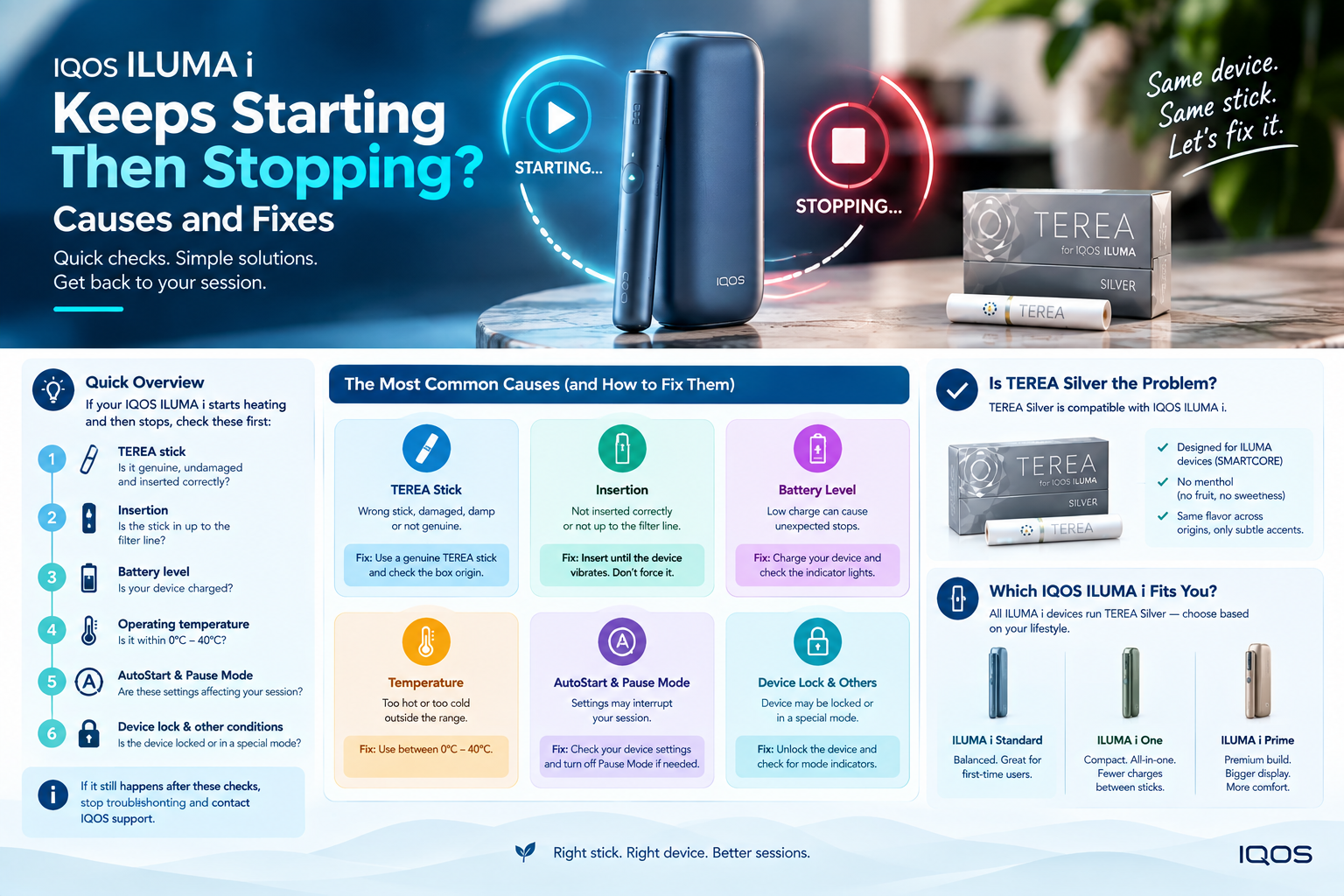
If your IQOS ILUMA i starts heating and then stops, check the TEREA stick, insertion, battery level, operating temperature, AutoStart and Pause Mode first. IQOS also lists device lock and other device conditions as possible causes. If the problem repeats after those checks, stop troubleshooting and contact IQOS support.
If you use TEREA tobacco sticks in Dubai, the first thing to understand is simple: the stick and the ILUMA device work as one system. TEREA sticks are designed for ILUMA devices, and the ILUMA i uses the SMARTCORE system to heat the stick without a blade.
So, a session that starts and then stops does not automatically mean your IQOS ILUMA i is broken.
What should you check first when IQOS ILUMA i starts then stops?
Start with the simplest causes before assuming there is a hardware fault.
Make sure you are using a compatible SMARTCORE stick, insert it to the correct level, check the device charge and confirm that the device is within its operating temperature range. IQOS lists these checks in its UAE troubleshooting guidance.
The order matters. Randomly resetting the device, changing settings or buying another product before checking the basics makes the problem harder to isolate.
Quick diagnosis
| What you notice | First thing to check |
|---|---|
| It starts but stops almost immediately | TEREA stick and insertion |
| It will not start reliably | Battery, AutoStart and device lock |
| It fails outside or in strong heat | Operating temperature |
| The screen looks like the session has paused | Pause Mode |
| The same problem happens with repeated fresh sticks | Device or battery issue |
This turns a vague problem into a much easier check.
Could TEREA Silver be causing the problem?
TEREA Silver itself is made for IQOS ILUMA and IQOS ILUMA i. The official IQOS UAE product page describes it as a balanced, toasted tobacco blend with light aroma notes of spicy herbs.
That means a genuine, correctly inserted TEREA Silver stick is compatible with the ILUMA i. The more useful question is whether the individual stick is inserted correctly, damaged, damp or otherwise unsuitable for the session.
IQOS says ILUMA i is designed to work with SMARTCORE STICKS and that the stick should be inserted up to the filter line. The company also says a non-compatible stick or incorrect insertion can affect the experience.
If you regularly use different market editions, it also helps to know exactly which pack you have. Terra Outlet lists country-specific options such as TEREA Japan, TEREA Swiss, and TEREA Uzbekistan so the packaging and origin are easier to identify.
Do not treat the word “Silver” as a technical specification. It is a flavour name. Compatibility comes from the TEREA SMARTCORE format and the ILUMA system.

Did you insert the TEREA stick correctly?
This sounds almost too basic. It is still one of the first checks worth making.
IQOS says to insert the SMARTCORE stick up to the filter line until the holder vibrates. The company also says not to reinsert a used stick.
Do not force the stick deeper than the marked position.
If the stick is visibly bent, crushed or damaged, use a fresh compatible stick rather than trying to make the damaged one work.
A clean test is simple: use one fresh stick, insert it correctly, then watch what the device does during preheating.
Could the battery be too low?
Yes. Battery status belongs near the top of your troubleshooting list.
IQOS recommends keeping the ILUMA i charged and provides specific charging-status indicators for the holder and pocket charger. The UAE support guide says a fully charged device shows all four strip lights as solid white during the relevant charging check.
For users with a separate-holder model, keep in mind that the holder and pocket charger have separate roles. A pocket charger that has charge does not mean every holder session is ready to run.
If you use the IQOS ILUMA i Standard and the device starts but repeatedly cuts out, confirm the holder charge rather than looking only at the pocket charger’s status.
For an all-in-one model, the same principle applies: check the device’s own charge state before blaming the TEREA stick.
Could Dubai heat affect the session?
The answer depends on the device temperature.
IQOS states that the operating temperature range for ILUMA i devices is 0°C to 40°C. If the device is outside that range, the experience can be interrupted or fail to start.
That matters in Dubai.
A device left in direct sunlight, inside a hot vehicle or exposed to excessive heat should not be treated the same as a device sitting indoors in normal conditions. Move it to a suitable temperature range and allow it to return to that range before testing again.
Do not try to cool a hot device with extreme methods. Give it time to return to a normal operating condition.
Temperature also matters during storage. Terra Outlet’s own product pages recommend keeping TEREA products away from excessive heat and moisture, although any specific storage temperature shown on retailer pages should be checked against the current product guidance before publication.
Could humidity affect TEREA sticks?
This is easy to overlook.
Official IQOS troubleshooting guidance identifies humid SMARTCORE sticks as a possible factor and advises keeping sticks protected from humidity.
That matters when products move between air-conditioned interiors and hot, humid outdoor conditions.
Keep the pack closed when you are not taking out a stick. If a stick has obvious physical damage or moisture exposure, do not use it as your test sample.
The goal is to remove variables. You want a known-compatible, fresh stick stored properly.
Is Pause Mode making it look like the device stopped?
This is one of the most useful checks on the ILUMA i range.
Pause Mode can pause an experience rather than completely ending it. IQOS says Pause Mode is available on applicable ILUMA i devices in Performance Mode, can be activated within the first three minutes or eight puffs, and can last up to eight minutes. If the experience is not resumed within that time, the holder switches off.
That creates an easy source of confusion.
A user sees the heating experience stop and assumes the device failed. The device may actually be paused.
On supported devices, the Touch Screen shows Pause Mode status. IQOS says the pause is activated with a downward swipe across the entire Touch Screen and resumed with an upward swipe.
If the pause indicators are present, follow the normal resume process before treating the event as a fault.
What is the difference between Pause Mode and a real shutdown?
A real shutdown ends the experience.
Pause Mode is designed to hold the experience temporarily and let the user resume it. IQOS says the holder automatically switches off when the eight-minute pause period ends without resumption.
The timing also matters.
Pause Mode is not available at every point in an experience. IQOS limits it to the first three minutes or eight puffs and requires the relevant battery mode.
That makes the symptom timing useful evidence.
If the device stops after an attempted swipe and the display shows the pause state, investigate Pause Mode first. If it simply shuts down without that state, continue with the other checks.
Does an IQOS ILUMA i need regular cleaning?
No normal blade-style cleaning is required.
This is one area where older IQOS advice can cause confusion. ILUMA i uses the SMARTCORE induction system and has no heating blade that needs the type of manual cleaning used with older blade-based IQOS models. IQOS explicitly describes ILUMA i as having no heating blade, no tobacco residue and no cleaning requirement.
That does not mean you should ignore every physical issue.
Inspect the device for obvious foreign material or damage and keep charging contacts in good condition according to the manufacturer’s instructions. But do not insert sharp tools into the holder or copy cleaning routines designed for older IQOS devices.
This is where some third-party troubleshooting content goes off track. One current competitor recommends cleaning the ILUMA chamber after every pack and presents residue buildup as a common cause of stopping. That recommendation does not match the official ILUMA i description.
Could AutoStart or Device Lock be involved?
Yes.
On a new ILUMA i, AutoStart is enabled by default according to the official UAE support page. IQOS also says users should check that AutoStart is activated and Device Lock is deactivated when automatic starting does not work.
This matters because “it stopped” and “it never completed the start sequence” are two different problems.
If your device behaves differently after changing settings in the IQOS App, check those settings before assuming the hardware changed.
For users who own an IQOS ILUMA i ONE, the same basic checks apply, but the physical design differs from the holder-and-pocket-charger setup.
Could the problem be a normal session ending?
Yes, so check what you mean by “stopping.”
IQOS states that the ILUMA i Holder is designed for experiences of up to six minutes or 14 puffs, whichever comes first. FlexPuff can provide extra puffs depending on individual usage patterns, but it does not apply to every experience.
So a device that reaches the normal session limit is behaving differently from a device that stops shortly after preheating.
That timing is worth recording.
Stops after a normal session: probably not a fault.
Stops seconds after starting: investigate the setup.
Stops at random points across repeated sessions: continue troubleshooting and consider support if the problem persists.
Does the ILUMA i model change the troubleshooting steps?
The basic checks stay similar, but the controls and features differ across models.
The ILUMA i and ILUMA i PRIME include the Touch Screen and advanced features such as Pause Mode and FlexPuff. IQOS says the ILUMA i range includes the relevant features and battery modes, while the exact feature behavior depends on the model and mode selected.
If you own the IQOS ILUMA i PRIME, pay particular attention to the Touch Screen and Pause Mode indicators.
Do not assume a troubleshooting video for an older IQOS model applies to ILUMA i. The heating system is different.
What if the same TEREA Silver pack works in one session but not another?
Look for the variable that changed.
Did the device become hot? Did the battery level change? Did you use Pause Mode? Was the stick stored differently? Did you insert it differently?
This is more useful than declaring the entire pack faulty after one interrupted session.
A single event does not tell you which variable caused it. Repeated behavior under the same conditions gives you better evidence.
For that reason, test the device under normal indoor conditions with a fresh compatible SMARTCORE stick and adequate charge. Keep the conditions as similar as possible across the test.
What if fresh TEREA sticks still stop the session?
At that point, the focus moves away from the individual stick.
Check the device charge, temperature, settings and visible status indicators again. If the same interruption happens repeatedly with correctly inserted SMARTCORE sticks under normal conditions, the device itself becomes the stronger suspect.
Official IQOS support directs users toward its troubleshooting and self-diagnostic tools when the basic checks do not resolve the issue.
Do not keep forcing repeated sessions if the device is behaving abnormally.
When should you contact IQOS support?
Contact support when the same fault continues after the supported checks.
This is especially important when the device repeatedly fails with different fresh sticks, behaves unusually even when charged, or shows a device status that you cannot resolve through the official troubleshooting steps.
IQOS UAE provides device support and warranty resources through its support area.
A retailer can help with product information, but technical device faults should ultimately be handled through the manufacturer’s support process when appropriate.
What should TEREA Silver users know about the product?
TEREA Silver is a toasted tobacco blend with light aroma notes of spicy herbs, according to IQOS. It is designed for the ILUMA family and uses the SMARTCORE format.
The current official UAE product listing shows TEREA Silver in both single-pack and 10-pack formats, with the 10-pack listing at AED 200 when crawled. The same page currently showed an out-of-stock status, so live stock and price should always be checked before publishing a fixed figure.
That is also why “TEREA Silver” and “IQOS ILUMA i troubleshooting” should be treated as two connected topics, not the same keyword.
Using TEREA Silver and IQOS ILUMA i in Dubai
Dubai adds a practical storage issue because device and product conditions can change quickly between indoor air conditioning and outdoor heat.
Keep the device within the manufacturer’s stated operating range and protect TEREA sticks from humidity. IQOS specifies a 0°C–40°C operating range for ILUMA i and gives humidity-related guidance for SMARTCORE sticks.
Terra Outlet states that it operates from Business Bay and delivers TEREA and IQOS products across Dubai and the wider UAE. Its current shipping page lists Dubai, Sharjah, Ajman, Abu Dhabi, Ras Al Khaimah, Fujairah and Umm Al Quwain among its delivery areas.
For product origin questions, users can also compare the available country-specific TEREA information rather than assuming every package comes from the same market.
Myth vs Reality: What ILUMA i troubleshooting advice should you ignore?
Myth: “ILUMA i needs regular deep cleaning.”
Reality: IQOS describes ILUMA i as a blade-free system that does not require normal cleaning.
Myth: “Any TEREA stick works in every IQOS device.”
Reality: TEREA SMARTCORE sticks are designed for the ILUMA system. IQOS warns against using TEREA with previous-generation devices.
Myth: “If the session stops, the device is broken.”
Reality: Pause Mode, battery state, stick insertion, device temperature and settings all need checking first.
Myth: “A different TEREA flavour automatically means a different heating system.”
Reality: Flavour names do not define the device technology. Compatibility depends on the stick format and the device family.
A simple troubleshooting order that saves guesswork
Do not change five things at once.
Start with a fresh compatible TEREA stick. Check the insertion line. Confirm the battery status. Check the device temperature. Look at the screen for Pause Mode or another status. Then test again under normal conditions.
If the same failure keeps appearing, stop changing variables and move toward official device support.
That gives you a useful record of what actually happened instead of a collection of guesses.
Frequently Asked Questions
Why does my IQOS ILUMA i start and then stop?
The first checks are the SMARTCORE stick, correct insertion, device charge, operating temperature, AutoStart and Pause Mode. IQOS lists these conditions in its UAE troubleshooting guidance.
Can TEREA Silver work with IQOS ILUMA i?
Yes. TEREA Silver is listed by IQOS as a TEREA tobacco stick for the ILUMA family, including IQOS ILUMA i.
Why does my ILUMA i stop in hot weather?
IQOS states that ILUMA i has an operating temperature range of 0°C to 40°C. A device outside that range may not start correctly or may have an interrupted experience.
Does TEREA Silver need special storage?
Keep TEREA sticks protected from humidity and excessive environmental conditions. IQOS specifically identifies humid SMARTCORE sticks as a troubleshooting factor.
Does IQOS ILUMA i need cleaning after every pack?
No. The ILUMA i uses the SMARTCORE induction system without a heating blade, and IQOS states that normal cleaning is not required.
How do I know if Pause Mode caused the problem?
On supported ILUMA i models, Pause Mode has specific Touch Screen indicators and operating conditions. IQOS says it can be activated within the first three minutes or eight puffs in Performance Mode and lasts up to eight minutes.
What if my ILUMA i keeps stopping with fresh TEREA sticks?
Recheck charge, insertion, temperature, settings and device indicators. If the same problem continues, use the official IQOS troubleshooting or support process rather than repeatedly forcing the device to run.
Is TEREA Silver the same as “Terra Silver”?
“Terra Silver” is commonly used as a search spelling for TEREA Silver. The official product name is TEREA Silver.
What to do next
Test one fresh, compatible TEREA stick under normal temperature conditions with a properly charged ILUMA i. Watch the Touch Screen if your model has one, and check whether the device is actually paused or has genuinely switched off.
If it still starts and stops after those checks, stop guessing. Use the official IQOS troubleshooting process and arrange support for the device.